
Walk into almost any mid-sized Australian organisation today and you will find the same quiet problem: a sprawling ICT stack built one urgent fix at a time. A new reporting tool here, an extra cybersecurity add-on there, a legacy platform kept on life support "just in case." Before long, the monthly software and managed services bill looks more like an enterprise budget than a lean operational engine.
Right-sizing your ICT landscape isn't about slashing budgets to the bone. It is about ensuring every dollar you spend actively moves the needle. To get there, leadership teams need to interrogate their current stack from two sharp angles: what it actually delivers, and whether the economics of staying put still stack up.

Efficiency vs. Insight: The Dashboard Trap
One of the easiest traps in modern IT procurement is confusing insight with efficiency.
Insight tells you what is happening. It gives you real-time dashboards, granular alerts, compliance scorecards, and weekly executive summaries.
Efficiency changes what happens. It automates manual handoffs, eliminates double-handling, reduces downtime, and frees up staff to do higher-value work.
Too many organisations pay a premium for tools that shine a bright spotlight on operational bottlenecks without actually clearing them. If a platform generates twenty automated reports a week, but your team still spends four hours manually copying data from one system to another, you haven't bought efficiency—you've bought a very expensive mirror.
The Acid Test for Your Current Stack
When auditing your applications and infrastructure, ask three blunt questions:
Does this remove work, or create it? If a tool requires dedicated internal admin hours just to maintain, configure, and interpret, its net efficiency may be negative.
What happens if we turn it off? If the only consequence is that a few monthly charts disappear, you are paying for insight, not operational output.
Are we using the automation we already pay for? Many businesses buy third-party point solutions to solve problems that their core platforms (like Microsoft 365 or their existing ERP) already handle natively.
The Cost-to-Value Equation: Are You Overpaying?
Even when a solution delivers genuine efficiency, it still needs to pass the cost-to-value test. In Australia, small-to-medium businesses typically spend between 3% and 7% of annual revenue on IT, with fully managed IT services generally sitting around $120 to $250 per user per month depending on security and compliance needs.
Value erosion rarely happens overnight. It creeps in through:
Tier bloat: Paying for enterprise-grade licences when 80% of your team only uses basic features.
Shelfware: Unused seats for departed staff or overlapping tools that do the same job across different departments.
Reactive support costs: Staying on cheap, ad-hoc "break-fix" arrangements ($150–$250+ per hour) that look economical on paper but bleed productivity through recurring downtime.
If your ICT spend is climbing faster than your headcount or revenue—without a matching jump in output or security posture—your cost-to-value ratio is out of balance.

What Does a Switch Actually Cost—and What Is the Pay-Back Period?
ecognising that your current setup is suboptimal is the easy part. The harder question for any CFO or CIO is: Is it actually worth the pain of switching?
Sticker price alone will mislead you. A realistic business case must account for the Total Cost of Switching, which includes both direct and hidden expenses:
| Cost Category | What to Factor In |
| Migration & Setup | Data extraction, cleansing, re-platforming, and third-party integration work. |
| Dual-Running Overlap | Paying for both the old and new licences during a 1-to-3-month transition window. |
| Change Management & Training | Staff time spent learning the new system and updating internal SOPs. |
| Temporary Productivity Dip | The short-term slowdown while teams build muscle memory on the new workflow. |
| Exit Fees | Early termination penalties or data-export fees buried in legacy vendor contracts. |
Estimating Your Pay-Back Period
To test whether a switch makes commercial sense, you can start with an oversimplified example of a pay-back period calculation—measuring the upfront switching cost against your expected monthly return (direct licence/support savings plus measurable productivity gains):
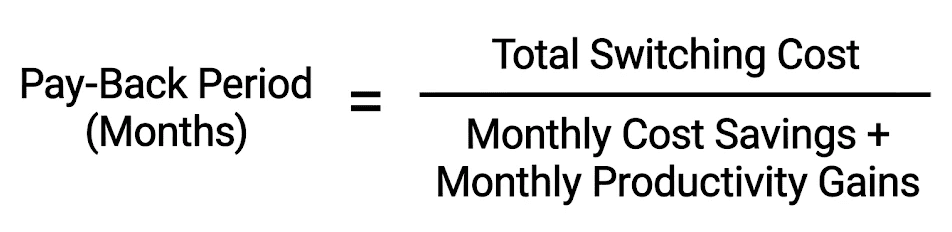
In practice, this formula is deliberately bare-bones. It won't capture nuances like the time value of money, staged rollouts, or harder-to-quantify wins such as reduced cyber risk and better staff retention. Still, as a rough directional filter for commercial ICT decisions, it holds up well:
Under 12 months: A clear green light. The risk is low and the return hits the bottom line within the current financial year.
12 to 18 months: Worthwhile if the switch also solves a major security, compliance, or scalability risk.
Over 24 months: Proceed with caution. Technology cycles move fast—if it takes more than two years justo break even, you may be better off renegotiating your current contract or optimising what you already own.
Right-sizing your ICT landscape isn't a one-off cost-cutting exercise; it's an ongoing discipline. By ruthlessly separating true efficiency from passive insight—and running the hard numbers on switching costs and pay-back periods—you turn your technology stack from a growing overhead into a genuine competitive advantage.